

RTXCgen Configuration Tool
Quickly and easily configure your application and the RTOS to meet your requirements
RTXCgen is a host-based configuration tool designed to save you time and effort in setting up and configuring your system—and then managing the kernel footprint at the end of your development. This powerful tool is included for no additional charge as a standard part of the RTXC Quadros RTOS distribution.
The RTXCgen configuration tool puts you in control. Use it to specify the exact RTOS configuration to fit your requirements including objects such as tasks, threads, pipes, semaphores, mailboxes, memory partitions, queues, mutexes and exceptions. You can also configure RTXC Quadros services and functionality.
RTXCgen then produces error-free C source code and header files that represent your specifications. And to save you time on re-build, its intelligent code generator only outputs C code or header files when a change requires it.
With the intuitive graphical interface you can use RTXCgen to scale the kernel footprint with simple mouse clicks and create application objects through high-level dialog boxes.
Below are some sample screens available to the developer in RTXCgen. These are just some of the many configuration possibilities.
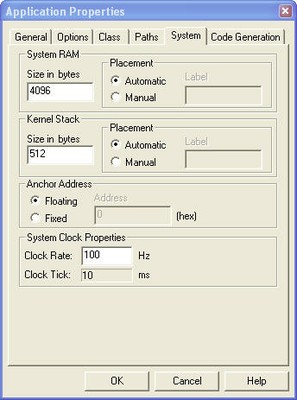
Some of the configuration options in the Application Properties – System tab include:
- The amount of memory to allocate for system RAM.
- The size in memory words of the application kernel stack.
- The frequency, in Hertz, of the system clock.
- The length of a clock tick in milliseconds, derived from the value in the Clock Rate field (this is not an editable field).
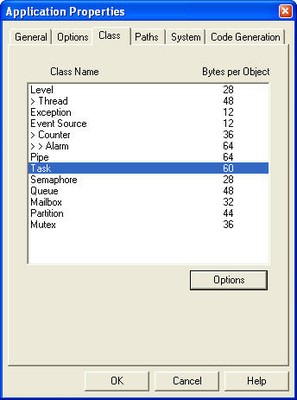
The Class tab within the Application Properties box lists the individual kernel classes and shows the amount of memory required for each object within the class.
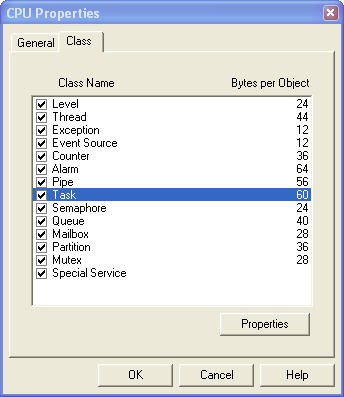
The Class tab within the CPU Properties section, allows you to specify which kernel object classes to support. Check the box next to each object class to be supported. When a class is disabled here, that class no longer appears in the tree for any applications under this CPU window.